
A tracking number that won’t load is one of the most common frustrations in online shopping and business shipping alike. Research from Smart Routes found that 91% of consumers actively track their packages, and nearly 20% check tracking status more than once a day. When that page refuses to update, the stress is real, even when the package is perfectly fine.
This blog breaks down exactly how online tracking works, what the common status codes mean, what to do when a tracking number stalls, and how to get live, real-time visibility on every shipment you send or receive.
Key Takeaways
- Most carriers update tracking within 24 hours of a scanned pickup.
- If a tracking number will not load, the label may not be scanned yet.
- Multi-carrier tracking apps can locate numbers that individual carrier sites miss.
- Live GPS tracking shows real driver location, not just a status code.
- 88% of consumers say real-time tracking is critical to a good delivery experience, according to Capital One Shopping’s 2026 e-commerce delivery research.
- Contacting the seller or shipper directly is often faster than waiting on a carrier’s automated system.
The Basic Steps to Track a Shipment Online
Tracking a package online follows a simple pattern, whether you are shipping across town or across the country.
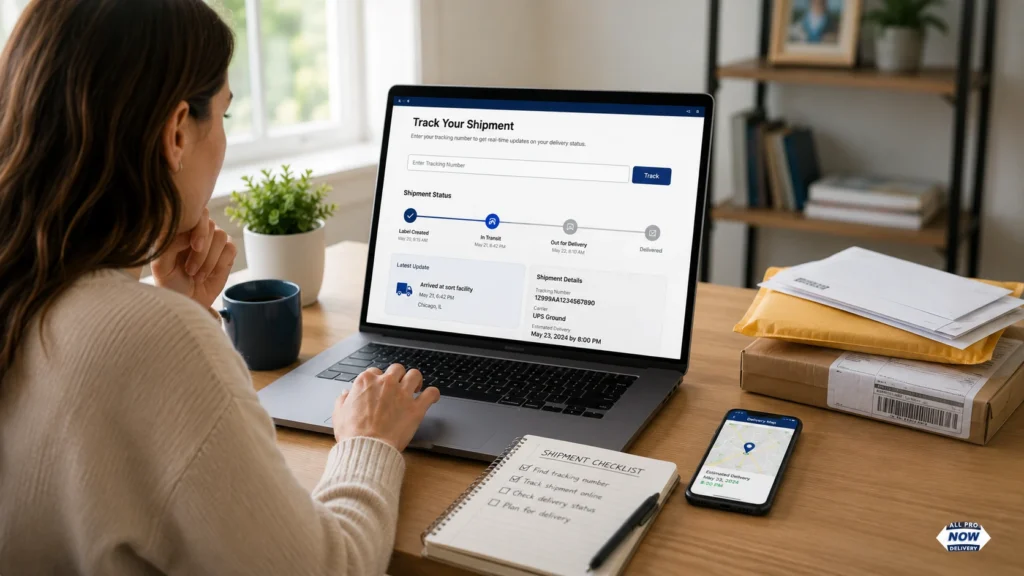
Step 1: Find your tracking number. This is usually emailed to you at checkout or texted once a driver is dispatched. It can also show up in a shipping confirmation inside the retailer’s app.
Step 2: Enter it on the carrier’s site. USPS, UPS, FedEx, and regional couriers all have a tracking field on their homepage. Paste the number exactly as it appears, without extra spaces.
Step 3: Read the status codes. “Label created,” “in transit,” and “out for delivery” each mean something different, and the table below breaks those down.
Step 4: Set up alerts. Most carriers let you request email or text updates so you are not stuck checking manually all day.
Step 5: Bookmark a backup tool. If the carrier’s own page ever stalls, a multi-carrier aggregator can pull the same data from a different source.
This five-step process covers the vast majority of everyday deliveries, from a single envelope to a full pallet of freight.
What Each Tracking Status Actually Means
A lot of confusion comes from status labels that sound alarming but are not. Here is a quick reference table.
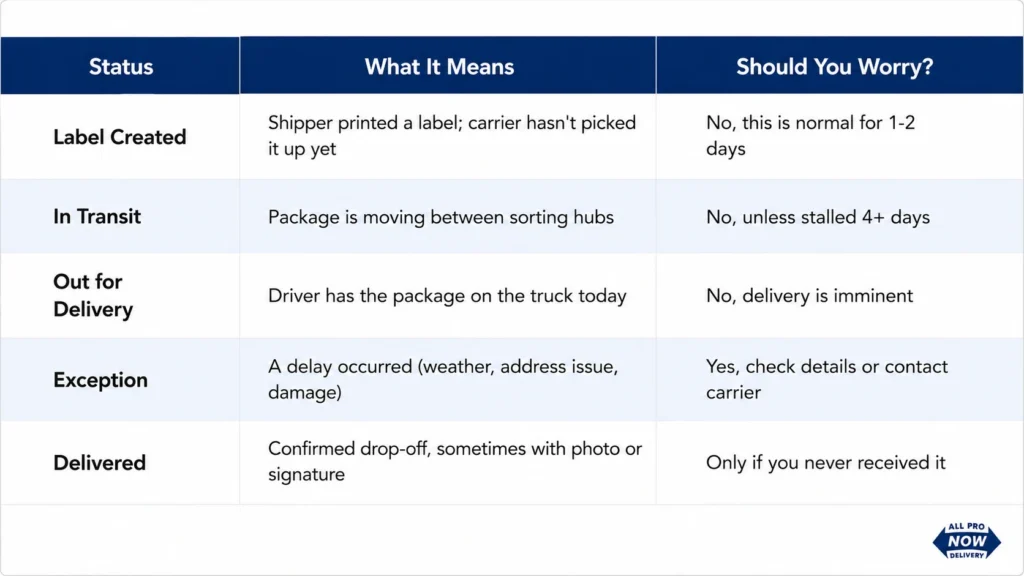
If your status has said “label created” for several days with no movement, that is often the first sign of a shipping delay rather than a lost package. Reading the status correctly saves a lot of unnecessary worry.
How Can I Track My Shipment Delivery Status Online When the Number Won’t Work?
This is where most people get stuck, and it is a common complaint on shipping and consumer forums. Buyers frequently report that a tracking number sits idle for a week while every other order they placed updates normally.
Here is what tends to help, based on real shopper experiences:
- Double-check the carrier: Some tracking numbers only work on the actual carrier’s website, not third-party trackers.
- Try a universal tracking tool: Apps that scan multiple carrier databases at once can catch numbers that a single carrier site fails to recognize.
- Wait 24 to 48 hours: A number can exist in the system before the first scan registers. Shippers sometimes print a label days before the actual pickup happens.
- Contact the seller directly: If the automated reply does not resolve it, ask for a corrected tracking number or proof of shipment.
- Escalate through the platform: Marketplaces typically offer buyer protection if a shipment never updates or arrives within the promised window.
- Check for a typo: A single transposed digit is one of the most common reasons a tracking number returns “not found.”
A slow-to-update tracking number does not automatically mean a scam. It often means a typo, a late scan, or an uncommon regional carrier that mainstream tracking sites do not fully support yet. Give it a day or two before assuming the worst.
Find Carrier by Tracking Number
Sometimes you have a tracking number but no idea who is delivering it. This happens often with marketplace orders where the seller does not name the carrier upfront. The number’s format is usually the fastest clue.
| Carrier | Typical Format | Digit Count |
| USPS | Starts with 94, 92, or 93 | 20-22 digits |
| UPS | Starts with “1Z” | 18 characters |
| FedEx | Numeric only | 12 or 15 digits |
| DHL | Numeric only | 10-11 digits |
| AllProNow | Shipment/order ID from your dashboard or confirmation email | Varies by order |
| Other Regional/Local Couriers | Varies by provider | Often shorter, alphanumeric |
A multi-carrier tracking tool can also identify the carrier automatically once you paste in the number, which is useful when a seller does not specify who is delivering.
Tracking Shipment Status Internationally
International tracking works a little differently, and it is worth setting expectations upfront. Customs holds, carrier handoffs between countries, and limited scan points can create visibility gaps of several days. International shipments often show fewer updates than domestic ones simply because fewer scans happen along the route.
A package can look “stuck” for three or four days while it is actually moving through customs clearance, which does not always generate a tracking event. Patience, combined with a multi-carrier tracking tool, usually closes that visibility gap and gives a clearer picture than any single country’s postal site alone.
Why Real-Time Tracking Has Become the Standard, Not a Bonus
Shipment tracking has moved from a nice-to-have to a baseline expectation. A 2025 Sifted consumer survey found that 63% of shoppers consider full delivery visibility essential, and only about 5% say they do not notice or care about tracking at all. Separately, Bettermile’s 2025 Real-Time Tracking Report found that 70% of consumers now rely on live tracking specifically for last-minute delivery flexibility, like rerouting a package or choosing a pickup point.
That shift in expectations is exactly why a live tracking map matters more than a simple status code for time-sensitive deliveries.
Live Package Tracking Map: Why Real-Time Location Matters
A status code tells you what happened. A live tracking map tells you where your shipment is right now. For same-day and regional deliveries, this distinction matters a lot.
This is where AllProNow fits into the picture. As a same-day delivery and freight partner serving businesses and consumers across Ohio, Michigan, Indiana, Western Pennsylvania, Northern Kentucky, and Florida, AllProNow builds live GPS tracking directly into its customer dashboard. Instead of a static “in transit” label, customers see the actual driver location and an accurate ETA, updated in real time.
This kind of live tracking is especially useful for:
- Medical facilities that need time-sensitive supplies confirmed on arrival.
- Retailers and e-commerce sellers managing customer expectations on delivery day.
- Construction firms coordinating material drop-offs around job schedules.
- Manufacturers tracking parts moving between regional plants.
What About Trackon and Other Regional Couriers?
If you are asking how can I track my Trackon courier status, the process is nearly identical to any other carrier: enter your tracking number on Trackon’s own site, since regional and international couriers are not always indexed by every universal tracking app. When a regional carrier’s number does not appear on a general tracking site, going straight to that carrier’s own portal is usually the fastest fix.
Business Shipment Tracking: A Different Set of Needs
Business shippers need more than a status page. They need proof of delivery, driver accountability, and predictable ETAs across every load. This is where a dedicated logistics partner makes a real difference, especially for time-sensitive or high-volume shipping.
AllProNow gives businesses across Northeast Ohio, Columbus, Toledo, Detroit, Akron/Canton, Youngstown, Pittsburgh, Indiana, Michigan, Northern Kentucky, and Florida:
- Real-time GPS tracking on every parcel, courier, and LTL shipment.
- Digital proof of delivery with signature capture.
- A dedicated driver network instead of a rotating pool of subcontractors.
- Transparent pricing with no fuel surcharge surprises.
If your business keeps running into vague delivery updates from a national carrier, a regional same-day delivery partner with live tracking built into the platform solves that problem for good.
Tracking Habits: What the Data Shows vs. What Actually Helps
| Behavior | What Research Shows | Better Approach |
| Checking tracking hourly | ~20% of consumers do this, per Smart Routes’ 2025 data | Check twice a day; set alerts instead |
| Expecting instant updates | 88% say real-time tracking is critical to experience | Understand normal scan gaps (12-24 hrs) |
| Assuming a stalled number is a scam | Common reaction on shopping forums | Wait 24-48 hours before escalating |
| Ignoring “exception” status | Often overlooked until delivery is late | Check exception details immediately |
Track My Delivery: A Quick Daily Checklist
For anyone managing several shipments at once, a simple daily habit keeps things organized:
- Check tracking once in the morning and once in the evening, not every hour.
- Save tracking numbers in one place, like a notes app or spreadsheet.
- Set delivery alerts so updates come to you automatically.
- Flag any shipment stuck on the same status for more than 48 hours.
- Keep the retailer’s order confirmation email handy in case you need to escalate quickly.
This routine turns “track my delivery” from a stressful chore into a five-minute check-in, whether you are managing one package or a dozen.
Common Reasons Tracking Shows “TBA”
A tracking status showing “TBA,” or to be announced, usually means the carrier has not confirmed a delivery window yet. This is common right after a package leaves a sorting facility, before it is loaded onto a final delivery route. It almost always resolves within a day as the shipment gets closer to its destination.
Final Thoughts: How Can I Track My Shipment Delivery Status Online With Confidence?
Shipment tracking does not have to feel like guesswork. Understand the status codes, use a multi-carrier tool when a number will not load, and give international or regional shipments a little extra time. With real-time tracking now considered essential by the majority of consumers, choosing a shipping partner that offers true live visibility, not just a status page, makes a measurable difference.
For businesses that need more than a tracking code, AllProNow’s live GPS tracking and dedicated driver network across Ohio, Florida, and the surrounding region turn shipment visibility into a real-time picture instead of a waiting game.
Ready for delivery tracking that actually keeps you informed? Get an instant quote from AllProNow and see your next shipment move in real time.